Wednesday, November 25, 2015

AT for Transition

Transition from high school to adult life can be tough for our students with disabilities. Assistive technology can be used to help aid this process. One aspect of transition that our students may struggle with is time management. The device that this blog post will focus on that can help with time management is: visual schedule. 

What is it? 

Visual schedules help our students by providing structure not only in the classroom, but in their daily life as well. They provide a visual for what activities are going to occur at what time and in what order. This helps them transition between different activities throughout the day instead of being fixated on one task.

Who uses it?

This blog post focuses on students in transition from high school and adult life but visual schedules can be used with all students. It especially helps transitioning students because it gives them a structure to their day and they can see what they are supposed to be doing at any given moment. This can help in adult life by getting them into a daily routine.

How to implement it?

Visual schedules can be implemented at home by introducing the schedule, pointing to it while stating what the person is supposed to be doing, and going back to the schedule after completing each task. This will get them into a routine. Pictures are very helpful as well. Having one picture represent an activity will save time and make it easier for them to know what they are supposed to do.

Where to buy it?

Visual schedules are better off homemade. This makes it more personal and relatable to the student. You can easily make them by hand or even print them out. Here is a great website to make your own printable schedule!

Future AT


What are some new and promising educational technologies that will be utilized in the classroom?

There are plenty of new assistive technologies on the horizon in education. Here are some technologies that will be implemented within the next five years: 

  • Cloud Computing: refers to expandable, on demand services and tools that are served to the user via the Internet from specialized data centers and consume almost no local processing or storage resources. 
  • Learning Analytics: an educational application of web analytics, a science that is commonly used by businesses to analyze commercial activities, identify spending trends, and predict consumer behavior. 
  • Wearable Technology: refers to devices that can be worn by users, taking the form of an accessory such as jewelry, sunglasses, a backpack, or even actual items of clothing such as shoes or a jacket. The benefit of wearable technology is that it can conveniently integrate tools that track sleep, movement, location, and social media. 


What are some resources for these technologies?

More information about cloud computing can be found at go.nmc.org/cloudand. This website shows research about the effectiveness of the cloud in many different educational settings. 

More information about learning analytics can be found at go.nmc.org/lace. This website shows data about the use of learning analytics in the classroom.

More information about wearable technology can be found at go.nmc.org/thermo. This website gives more information about wearable technology and gives examples. 


Citation: 
Johnson, L., Adams Becker, S., Estrada, V., and Freeman, A.
(2014). NMC Horizon Report: 2014 K-12 Edition. Austin, Texas: The
New Media Consortium.


Wednesday, November 4, 2015

AT for Early Childhood


Early childhood education is important because it involves investing in the wonder years like the picture above states. These years are pivotal in children. They are developing their communication, social, motor, cognitive skills and more. Assistive technology can be used for those children that we see having a developmental delay in any of those areas. One AT tool that can be used to support development in motor skills is the Pop-Up Toy. 

What is it? 

The Pop-Up Toy assists infants and toddlers in developing motor skills, especially in their index finger. The toy functions by pressing down on one of the colored pegs. This will cause it to bob up and down on concealed springs, as the website describes it. The index finger is the easiest to use to get the job done so it promotes the use of the index finger. 

Who uses it?

This toy helps children who have shown developmental delays in their motor skills, especially in their fingers, This toy is appropriate for the age group as well. Children like to play with toys to occupy their time. This will help them have fun as well as develop finger muscles. 

How to implement it?

This can be used at school, home, or basically anywhere. Parents or teachers can usually just set a toy in front of a child and they will play with it and/or figure out how to use it. If they do not play with it, you can model how to use it. If the child is not playing with it as often as you would like, then you can have a time block set aside to sit down with the child to play with it. 

Where to buy it?

You can buy the Pop-Up Toy at its website!  It is only $11.49 plus any shipping and handling fees. 


AT for Math


Math is another area of weakness for some students with disabilities. Our students struggle with computation, organization/aligning, copying problems to paper, memorizing facts etc. Assistive technology devices can be implemented to support these weaknesses.

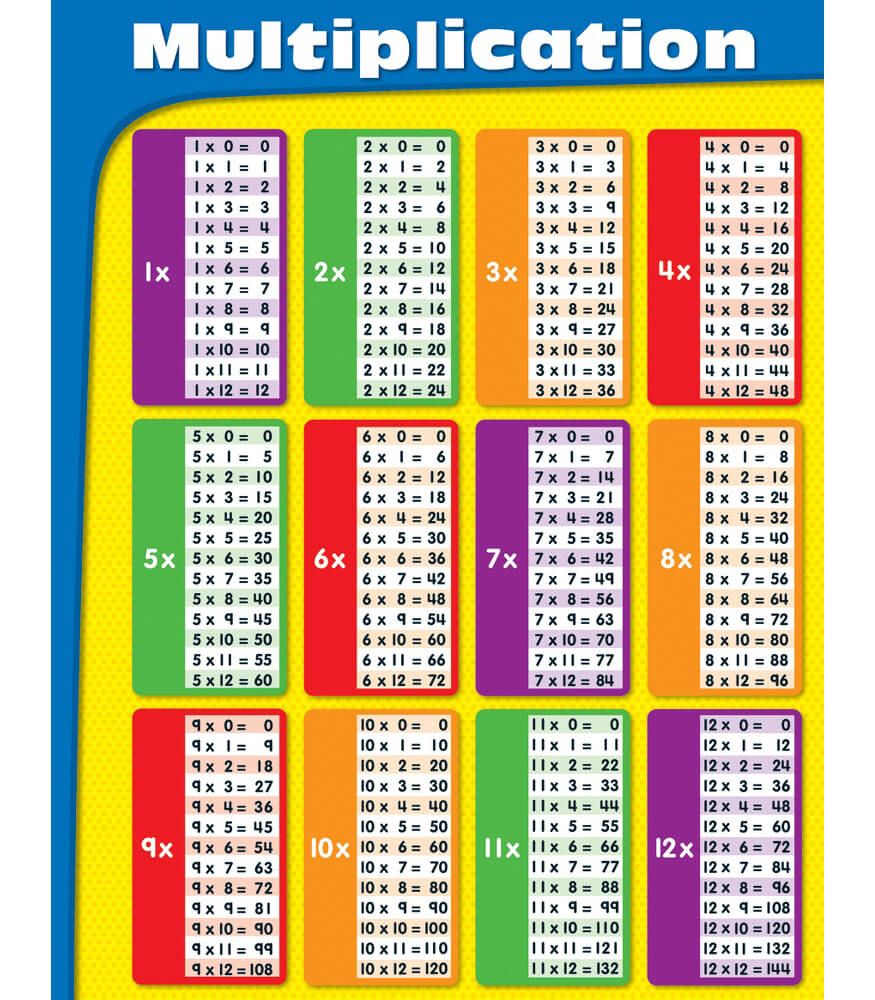
Memorizing facts can be difficult for any student but especially those with cognitive disabilities. Sometimes the memorization of the facts is not the most important skill that needs to be developed. This can be assisted through a low tech AT tool like math facts charts.

What is it?

Math facts charts can be used for addition, subtraction, multiplication, and division facts. They do require minimal thinking because the student has to have the conscious ability to go to the correct fact. They are sometimes controversial in the classroom because they cannot be used on statewide tests so they should not be used on a daily basis but for our students, we can put them on their IEP if we see a great need and then they are able to use them for important tests.


Who uses it? 

Students who have difficulties memorizing facts can use these charts. It helps take out the frustration and saves time. There comes a point where knowing every single fact is not of utmost importance. These charts then come into play and allow our students to focus on other areas of math.

How to implement them?

Math facts charts can either be pre-made or handmade. If a student is capable of creating their own, definitely give them that opportunity. They can be given a blank chart to fill in all the answers. This will make the charts more personal for them. If they are not able to make their own, one can be given to them. Some charts are harder to understand than others. Try to find easier ones like the one shown above. Teaching how to use them is important as well. Someone may have to model to the student how to use the chart until the student is able to use it on their own.

Where to buy them? 

They can be bought at most retail stores or can be printed off the internet. Blank sheets of paper can be used as well for DIY charts.

AT for Writing


Writing has many different aspects that we have to keep in mind with our students with disabilities including the transcription of thoughts onto paper, forming logical sentences, spelling, organization, etc.

Sometimes physically using a writing utencil is the main barrier for students with disabilities. They have the ability to form sentences, spell, and organize their writing but cannot sit down with a pencil and write down their thoughts. The assistive technology this blog post will focus on helps with that by allowing students to orally recite their thoughts instead of writing them.

What is it? 

This assistive technology is called wordq+speakq. It is a software that provides three specific supports: word recognition, speech feedback, and speech recognition

How to implement it? 

This software can be installed on school computers, personal laptops, or home computers. It is important to teach our students how to use it. The website provides great tutorial videos that can be used to either educate yourself (as the teacher, parent, etc.) on how to use it so you can help your student or child or if the student is capable of learning on their own, they can watch the videos and play around with the program a little bit. Here is an example of the how-to video for using the speech recognition feature: 


Who uses it? 

Some examples of who could use it are: students who have difficulties gripping writing utencils, students who have poor handwriting, and students who have better oral language skills than writing skills. The website also states this, "Our users include students from primary school to college, CEOs of major corporations, journalists and many more. How they use it is completely personal to their needs as wordQ is flexible and adapts to your needs. WordQ + SpeakQ offers you the support you need only when you need it, instead of distracting you with features and functions you aren't using." The great benefit to using this product is that it is very adaptable and universal. Anyone can use it to support multiple needs.


Where can I buy it?


This software can easily be bought from its website. There is also an option for a free trial so you can try it out first to see if it is a fit for your student/child. The website sells it for only $199. You can receive it in the form of a shipped DVD or an online activation code. This is a great option if you needed it right away.

Tuesday, October 13, 2015

AT for Sensory Impairments

Sensory Impairments


Sensory impairments can include limited or lack of ability to use three senses: sight, touch, and hearing. The most common of these are blindness, deafness, and deaf-blindness. 
Deafness is something I was interested in a while ago and still would love to learn more about. I watch a TV show that focuses around the Deaf community. It is funny because sometimes I'll be distracted while watching it and then I'll realize that there are Deaf people on the screen signing to each other. It gave me a tiny glimpse of what it is like to be Deaf. You have to pay close attention to everything and everyone around you or else you miss out on a lot. 

The tool this post will focus on is captioning. Closed-captioning is often offered for every TV show or movie. It is simply the words being shown on the screen as they are being said as well as any background events/sounds happening. YouTube even has a feature to turn on captions for a good amount of their videos. Although those are hit-or-miss with their accuracy, it is still more than the Deaf community had even five years ago and I think YouTube will improve their captioning service with time. 


AT for Positioning

Positioning/Mobility

Students with physical disabilities are still ABLE. They do not let their disability get in the way. This is all thanks to assistive technology that gives them more control over their body. 

The limitations that students with physical disabilities face can range anywhere from limited leg movement to hand movement to finger movement. The tool this post will focus on can help with all three of those: The EyeGaze Edge Tablet. 
This device allows the user to communicate through the use of their eyes. They simply move their eyes to the area on the screen they so choose in order to write, select an option, etc. This is an excellent resource both in the classroom and at home. Students are able to communicate their wants and needs through a simple eye gaze. They can even begin to write out what they want to say. There is word processing software that predicts and helps speed along the process as well. 

You can buy the EyeGaze Edge Tablet at logantech.com. It is quite expensive (a little bit over $10,500) but being able to communicate with someone who otherwise cannot, at least not in the capacity that they can with this device, is priceless. 


AT for Behavior

Behavior in the Classroom


Behavior of our students can be very unpredictable. Although behavior might be one of your prepatory classes, you can never been completely prepared for behavior in the classroom, even day-to-day.

ESE students who seem to display noticeable behaviors the most are those with autism and those with emotional and behavioral disorders (EBD).
The most common way to manage their behaviors are through behavior charts. These charts often reward children for good behavior in increments of time. The AT tool this post will focus on is a timer. 

Timers can be implemented into the classroom in a variety of ways. You can establish a system of time increments in which the student is expected to maintain good behavior throughout the entire time period. If they misbehave once, the timer starts over again. Once the student makes it until the bell rings, then they can either receive a token in token reward system or are able to have 'Student Choice' where they can choose to either play a game on the computer, iPad, go for a walk, etc. I have seen both methods done in the classroom and they are quite effective. Students like having a choice and if they have something to look forward to, they are more conscious of their behavior. It helps develop self-control.

Timers can be bought at many retail stores such as Wal-Mart, Target, K-Mart, etc. The great thing about them is that they can be used for multiple purposes in the classroom!

AT for Reading

READING! 

Reading plays such a pivotal role in education. It is simply the foundation for everything else! That's why it is important for us as educators to ensure that our students learn how to read efficiently. 

Often with students who have disabilities, reading is an area of weakness. Not to fear, there are PLENTY of assistive technology tools out there to aid our students in the learning process. It can be anything from highlighters (low tech) to electronic page turners (high tech), This post will focus on a simple one: HIGHLIGHTERS! 

Highlighters can greatly help students with learning disabilities. LD students sometimes have difficulties not only reading but also comprehending. Highlighters can help them highlight the main ideas. This will take the pressure off of them to remember every single detail and instead focus on the important details. 

Highlighters can be bought at many places such as Walmart, Target, Dollar Tree, etc. They come in different shapes and sizes. Our student who may not necessarily like the grip of a thick marker can use the thin one. They come in many different colors as well. This can help our students organize their thinking while they are reading. They might use yellow for main ideas, pink for character names, and blue for settings. 

Wednesday, September 23, 2015

AT for Communication

Proloquo2Go

Proloquo2Go is an app that uses symbols to support communication. It is very user-friendly and can be used by both beginners and advanced users. It can be customized for each individual student through editing the content and adding personalized symbols. When asked questions, the students can reply simply with one word or use phrases followed by what they want to say. 


Here is a video of Proloquo2Go being used in the classroom! This helps give you a sense of how it can be used in the classroom as well as how it works. When asked if they knew what day it was, the students immediately selected the "Today is" phrase. 


You can buy this app at the iTunes app store. It can be used on an iPhone, iPad, iPad, or even Apple Watch. It is currently only available in English but it does have UK, US, and Australian versions. The cost is up there a little bit at $249.99 but it can move mountains for non-verbal students to communicate. 

Tuesday, September 22, 2015

SETT


STUDENT
ENVIRONMENT
TASKS
TOOLS

This anagram is used to help us as educators select appropriate assistive technology for our students based on their individual needs.

  • Start with the student. Identify the nature of their disability and how it affects their learning.
  • Then think about the environment they are learning in, keeping in mind the physical arrangement of the classroom as well as the instructional arrangement whether it be one-one-one, small group, etc.
  • Next, think about the tasks at hand. What are you expecting the student to do? What do they need to do in order to show their learning?
  • Lastly, think about the tools they need to be successful. This includes low to high tech as well as strategies to be implemented. 

Accessible Educational Materials

What is AEM?


Accessible Educational Materials, or AEM, are materials used to help students learn and succeed in their academics. These materials are specifically made to accommodate students across all learning needs.

Who needs AEM? 
Students with an Individualized Education Plan, or IEP, often have accommodations listed that they are able to receive. The IEP goals can include technology, specialized instruction, or support from outside professionals. The IDEA Act focuses mainly on printed text through braille, large print, audio, etc.

AEM can also be called AIM (Accessible Instructional Materials) so here is a joke for those folks that remember AIM usernames.
Resources for AEM
The National Center on Accessible Eduational Materials' YouTube Channel is a great resource to not only become knowledgeable about AEM but also shows them in action. Here is an example of a video on their channel:

Universal Design for Learning


What is Universal Design for Learning?

UDL, or Universal Design for Learning, is an integrated component in curriculum that allows not only students with disabilities, but every single student to LEARN.

There are three principles that make up UDL:

  • Multiple Means of Engagement
    • This involves using the students' interests to keep them motivated and giving them a choice in their learning.
  • Multiple Means of Representation
    • This involves presenting the information in various forms that help ensure students' understadning. 
  • Multiple Means of Action/Expression
    • This involves preparing many ways for students to show their learning.
What are some benefits of UDL?

To quote this YouTube video, "universal design for learning improves educational outcomes for all students by ensuring meaningful access to the curriculum within an inclusive learning environment." This quote perfectly sums up the benefits of UDL. By following the principles listed above, educators are able to bring forth life from a curriculum that might otherwise do nothing for some students. I really encourage you to watch the YouTube video I linked above. It gives a great overview of UDL and explains how it has changed education. 

What are some resources for UDL?

The National Center on Universal Design for Learning has a website that provides tons of UDL examples and resources. There are links to lesson plans, activities, games, interactive websites, etc. The best part is that it is categorized based on the different principles of UDL. 


Wednesday, August 26, 2015

Assistive Technology Overview

http://www.livebinders.com/play/play?id=669428


What is Assistive Technology?

In a nutshell, assistive technology is a piece of equipment that supports a student with a disability. They are often used in the classroom for students with disabilities to show their learning but they can also assist people on daily functional skills.

What are the “levels” of AT?
There are three levels of assistive technology: low, mid, and high. 

Low: Low assistive technology is anything used that is usually cheap, no mechanical operation, and simpleAn example of this would be a pencil grip

http://www.amazon.com/The-Pencil-Grip-Universal-TPG-11106/dp/B001SN8HOY

Mid: Mid assistive technology is anything used that is usually more expensive, requires batteries, and are a little more complex to use than low tech. An example of this would be a digital recorder.

http://www.amazon.com/Sony-ICD-AX412-Stereo-Digital-Recorder/dp/B004M8STL8
High: High assistive technology is anything used that is quite expensive, digital, and requires training in order to use it. An example of this would be an electric wheelchair.


http://www.customizedmobility.com/Electric_Wheelchairs_Electric_Scooters.html

What are some resources for AT?
I currently reside in Palm Beach County so a great resource here can be found right on the school district website! There are links to resources for handwriting, study skills, math, reading, and specificially for ASD and IND students.